.jpg)
Share this article:
What variant rendering means
You have a control (what exists now) and one or more variants (the changes you're testing). Variant rendering is how the system picks which version a specific visitor gets and displays it in their browser. The visitor is assigned to a group, the system loads the correct version for that group, and the browser displays it. Where and when those steps happen separates client-side, server-side, and edge-side rendering, and it determines the tradeoffs you make around speed, flicker, and engineering effort.
Client-side rendering: the most common approach
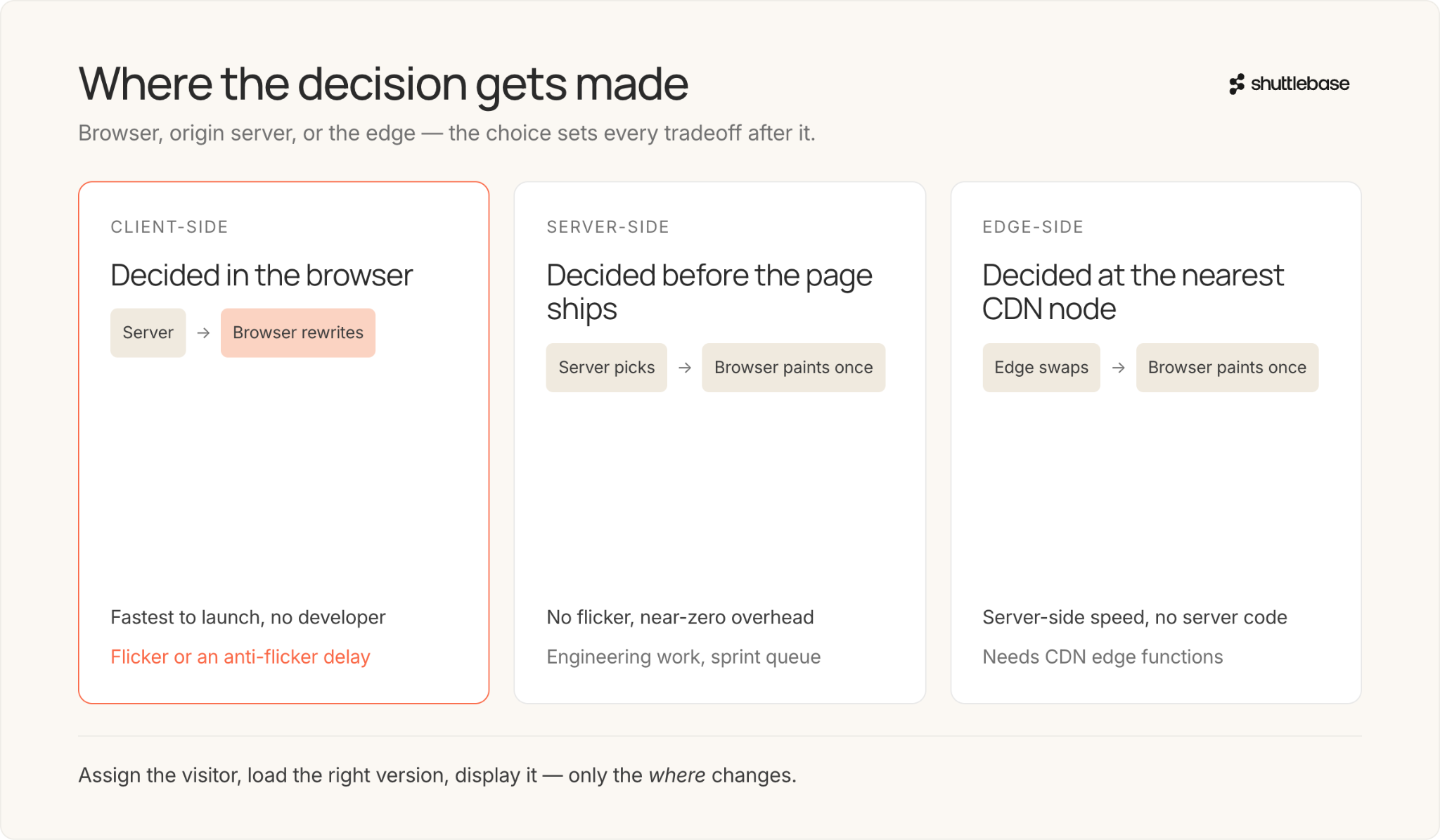
Most A/B testing tools load a JavaScript file in the visitor's browser alongside your original page. That script checks which experiment is running, looks up the visitor's group assignment, and rewrites parts of the page to show the variant. The actual HTML gets modified after the browser has already started rendering it.
It works, and most tests run this way today. The trouble is timing. If the testing script loads slowly, the visitor sees your original page for a beat, then watches it rearrange into the variant. That visible switch is called flicker, and it's the single most common complaint about client-side testing.
How flicker affects tests and user experience
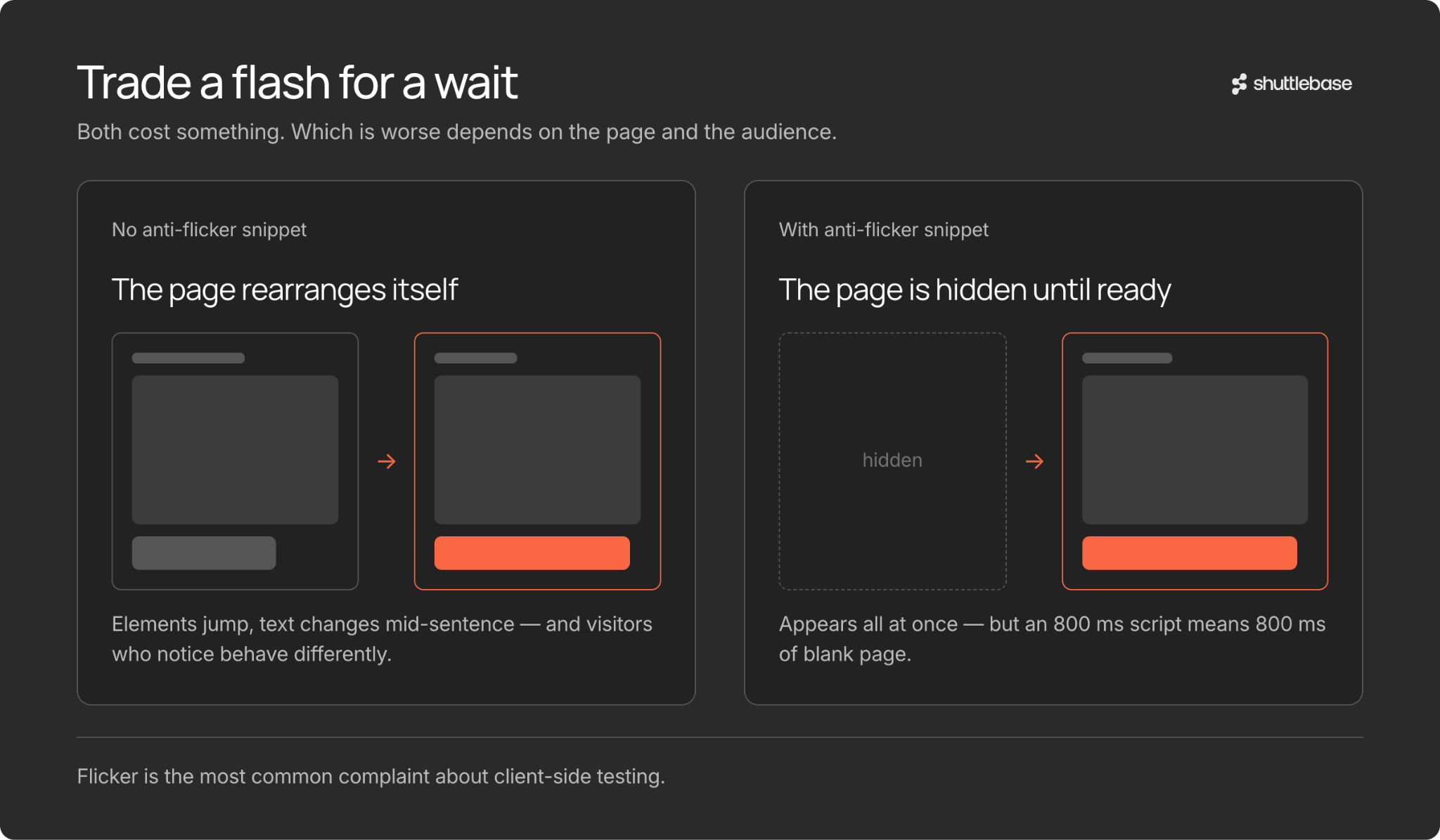
When a page loads and then visibly rearranges itself, two things go wrong. The experience feels broken. Elements jump, text changes mid-sentence, buttons shift position. And it can skew your test results, because visitors who notice the switch start behaving differently for reasons that have nothing to do with the variant you're testing.
Most tools solve this with an anti-flicker snippet: a small piece of code that hides the page until the testing script has loaded and applied the variant. The page appears all at once instead of loading and then shuffling. The cost is delay. If the testing script takes 800 milliseconds to load, the page is hidden for 800 milliseconds. You've traded flicker for a loading delay, and which is worse depends on the page and the audience.
Server-side rendering: no flicker, more work
Server-side rendering skips the browser entirely for the decision step. The server figures out which variant to show before it sends the page. The visitor's browser receives a finished page with the variant already in place, and it loads like any normal page.
From the browser's perspective, nothing unusual happened. It got a page and displayed it. There's no extra JavaScript, no DOM manipulation, and no visible switch. The performance overhead on the visitor's end is essentially zero. The catch is that someone on your team has to build the logic that picks which variant to serve. You can't do this through a visual editor. It's developer work, and for many teams that means it goes into the sprint backlog and waits.
Edge-side rendering: a newer option
Edge-side rendering makes the variant decision at the CDN layer. CDNs are the networks of servers that deliver your site from locations physically close to each visitor. A small program running at the nearest edge server checks the visitor's assignment and swaps in the correct variant before the page reaches their browser.
You get the speed of server-side rendering without writing server-side code in most cases. The visitor receives a fully assembled page, and the response is fast because the decision happened at a geographically nearby server rather than a distant origin. Edge-side rendering has picked up significant adoption since 2024 as these platforms have matured.
Keeping assignment consistent
Whichever rendering method you use, the system has to remember which group it put each visitor in. If someone sees variant B on Monday, they need to see variant B again on Wednesday. Inconsistent assignment corrupts your data.
Most tools store the assignment in a cookie or in the browser's local storage. When a visitor first shows up, the tool picks a group at random and saves it. On return visits, it reads that saved value and serves the same variant. Some tools skip cookies altogether and use hashing, where the visitor's identifier gets run through a function that always returns the same result for the same input. Hashing has gotten more popular as browsers have tightened restrictions on third-party cookies.
The step-by-step of a client-side test
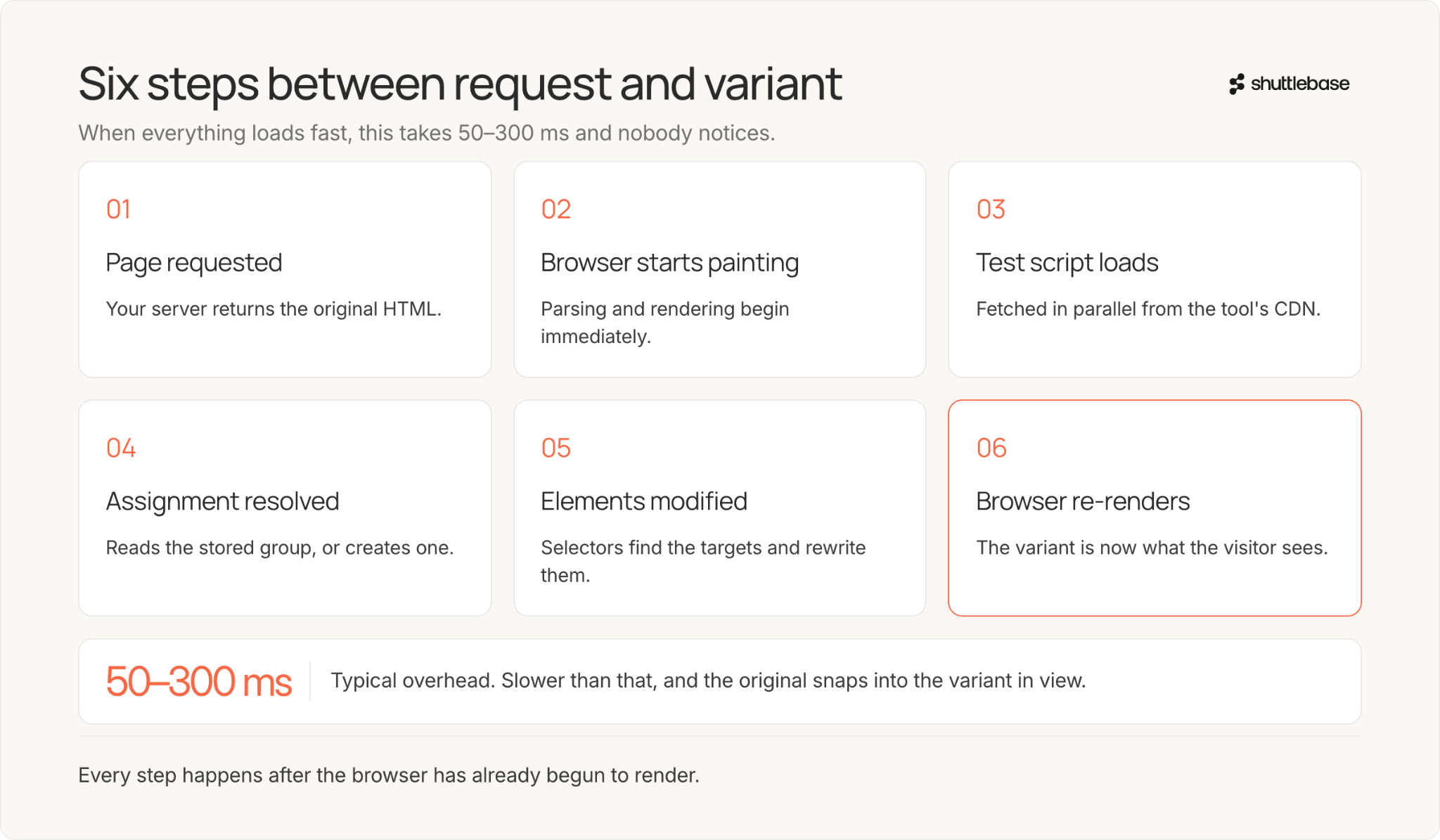
A typical client-side test plays out like this. The visitor requests your page. Your server sends back the original HTML. The browser starts parsing and rendering it. At the same time, it loads the testing tool's JavaScript from a CDN. That script checks the experiment config, looks up the visitor's assignment or creates a new one, finds the page elements it needs to change, and modifies them. The browser re-renders.
When everything loads fast, this takes 50 to 300 milliseconds and the visitor never notices. When the testing script is slow, or the page finishes rendering before the script is ready, the visitor sees the original version snap into the variant. That's flicker. The overhead depends on the tool, the CDN, and how much the variant changes on the page.
Snippet-based vs. full-page rendering
Not every client-side test modifies the existing page. Some send the visitor to an entirely different one.
Snippet-based rendering is the standard. A JavaScript snippet loads on your page and makes targeted changes: swapping a headline, recoloring a button, rearranging a section, hiding an element. Your existing page is the foundation and the script adjusts parts of it.
Full-page rendering, sometimes called redirect testing or split URL testing, sends the visitor to a different URL with a completely separate page. The browser loads a fresh page from scratch, so there's no DOM manipulation and no flicker. The downside is that you have to build and host that alternate page yourself, which puts you back in the territory of needing a designer and a developer.
How autonomous platforms handle it
Autonomous CRO platforms take a different path. They generate variants as purpose-built JavaScript that runs through a lightweight snippet already on the site. The variant code goes through automated QA before anyone sees it. A live error monitor watches for broken selectors or failed element insertions while the test runs, and if something breaks, the system can fix it and re-run QA automatically.
The rendering is still client-side under the hood, but the variant code is built specifically for the page it runs on rather than assembled through a drag-and-drop editor. The usual client-side tradeoffs still apply, but the QA and error monitoring layers catch the kinds of problems that normally slip through and quietly break a test without anyone noticing.
Choosing the right approach
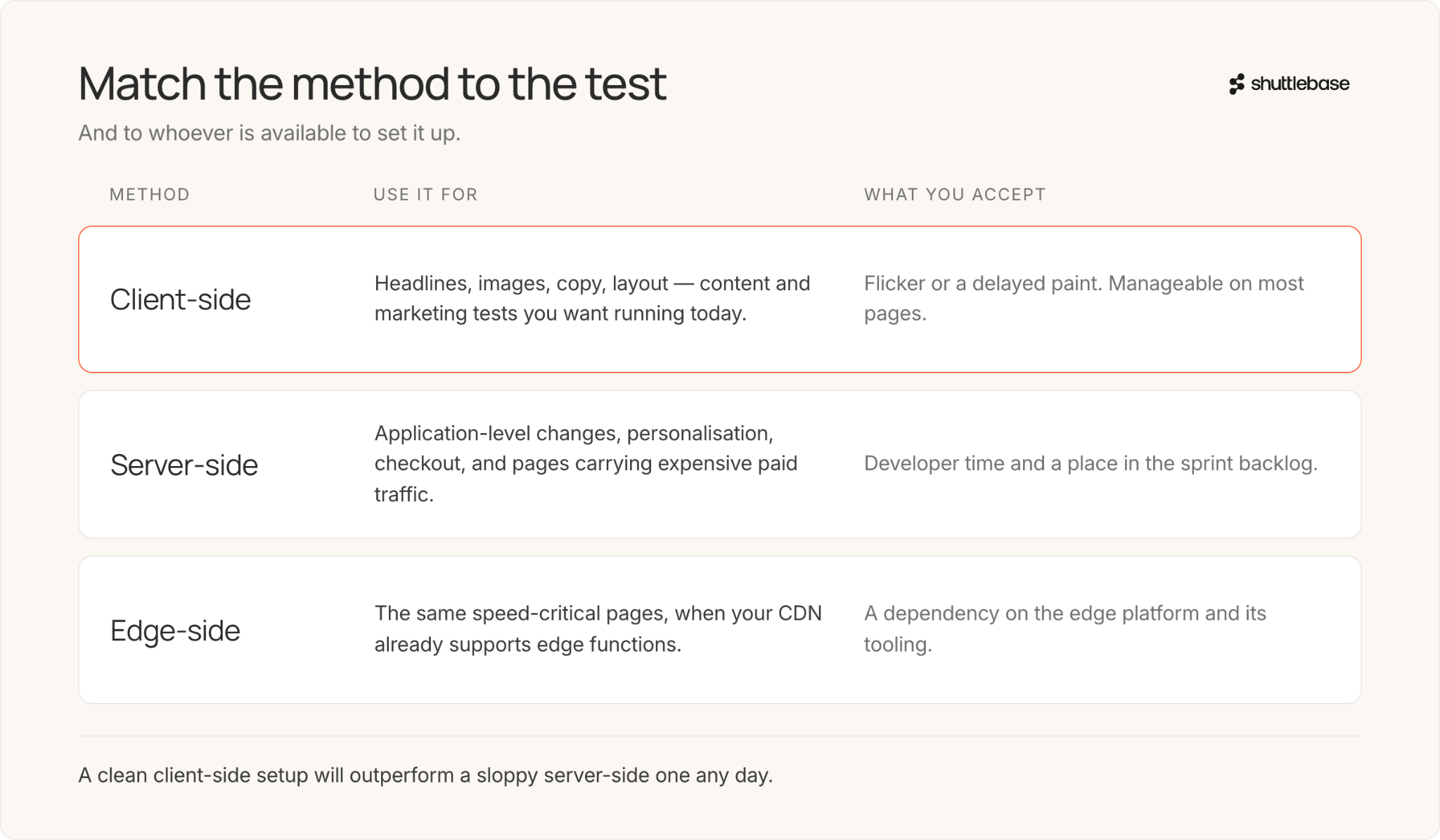
The right method depends on what you're testing and who can set it up.
Client-side rendering is the fastest to get running. It works well for content and marketing tests: headlines, images, copy, layout changes. Flicker or delayed load time are the known tradeoffs, and are manageable on most pages.
Server-side rendering makes more sense for application-level changes, personalization, or pages where speed is non-negotiable. Checkout flows and landing pages with expensive paid traffic are where you feel the difference most.
Edge-side rendering is worth a look if your CDN supports edge functions. You get server-side speed without writing and maintaining server-side code.
Pick whichever method your team can implement correctly. A clean client-side setup will outperform a sloppy server-side one any day.
.jpg)
.jpg)