Share this article:
Will AI Break My Site? The Risks of Unguarded AI Conversion Rate Optimization
A/B testing your way to a better website is simple to describe but hard to run. Someone has to work out what’s not working on the current site, design a fix, build it, run it against your current page, and interpret the result. Then do it again next week and the week after that. Most site owners cannot staff that, so the list of untested ideas grows while the site stays as it is.
AI conversion rate optimization takes that job on. Ideally, the AI analyzes how visitors behave on the site, decides what needs fixing, writes the code for a new version of the page, runs that version against your current page as an A/B test, and keeps what wins. It does that continuously instead of once a quarter.
The part that makes this process work is the part that worries people. Those new versions reach real shoppers on your live site, and they might not have anyone sitting between an overly-motivated AI and what those shoppers see. The question to ask is what happens when one of those AI-written versions reaches customers before anyone realizes it’s wrong.
How AI conversion rate optimization changes your site
To understand how the AI does what it does, we’ll first need to understand how a website page is rendered in a browser. Imagine an eCommerce website with a product page that a shopper is looking at right now. That page does not actually exist until the shopper asked their browser to render it. Technically, their browser does the following: pulls the site code and styling (HTML, CSS), adds any dynamic content (Javascript), and renders everything together. A more illustrative example for this process is that the browser:
- Pulls the site’s theme
- Adds the reviews widget and the cookie banner
- Generates the currency selector
- Checks whether the user is logged in
- Renders the cart and their country and whether the item was on sale
- Then assembles a page out of all of that in whatever order those scripts happened to load.
A site owner interested in running optimization on such a page will usually default to A/B testing: try a different version of the page on some of the traffic, keep the original on the rest, and measure which one performs better. Three terms matter here, and they nest.
The “change” is what is different on the page - a rewritten button label, a moved block, a new banner. The “variant” is the packaged version that applies those changes. The “A/B test” is the traffic split that runs the variant against the original page, called the “control,” so you can measure the difference in behavior.
That nesting is the whole story of how AI conversion rate optimization reaches a shopper. The AI does not sit in the browser poking at the page. It writes the variant. A small script on your site then loads that variant in the shopper’s browser, finds the elements the variant was told to change, and applies the changes while the page is still assembling - alongside your theme, your apps, and everything else already running.
For a variant to change an element, it first has to find it, which is a very fragile process. A specific element is identified by the structure of your page, using something like the class name (that’s html technical-speak) your theme gave a button, or its position inside some other element. Those names and positions belong to your theme and they change when your theme changes.
So the variant is interacting with a page that is already being assembled, in a browser the AI does not control, on a device it has never seen, while moving things around. That process turns out to be extremely error prone, as anyone who has ever run an A/B test on a website can attest to.
One assumption behind everything we’re going to discuss below
Everything here is about that delivery path: a variant applied by a script in the shopper’s browser, layered on top of the page your site already sent. Most AI conversion rate optimization tools work that way, Shuttlebase’s included.
That is a different situation from an AI that writes code into your theme or your repository. When a change lives in your own code, it ships through your build and deploy process, and your normal code review, testing, and release steps apply to it. Those setups carry real risks too, and they are different risks for which different mitigation techniques apply.
The failures in this post are the ones specific to variants applied in the browser, at page load, alongside everything else you have running on that page.
What AI "defacing a site" actually looks like
Let’s talk about what real failure cases might look like when any tool (AI or otherwise) ships a variant onto a live page. Most of these issues cost the site owner money without anyone noticing, which is what makes them worth naming out loud.
Visual damage
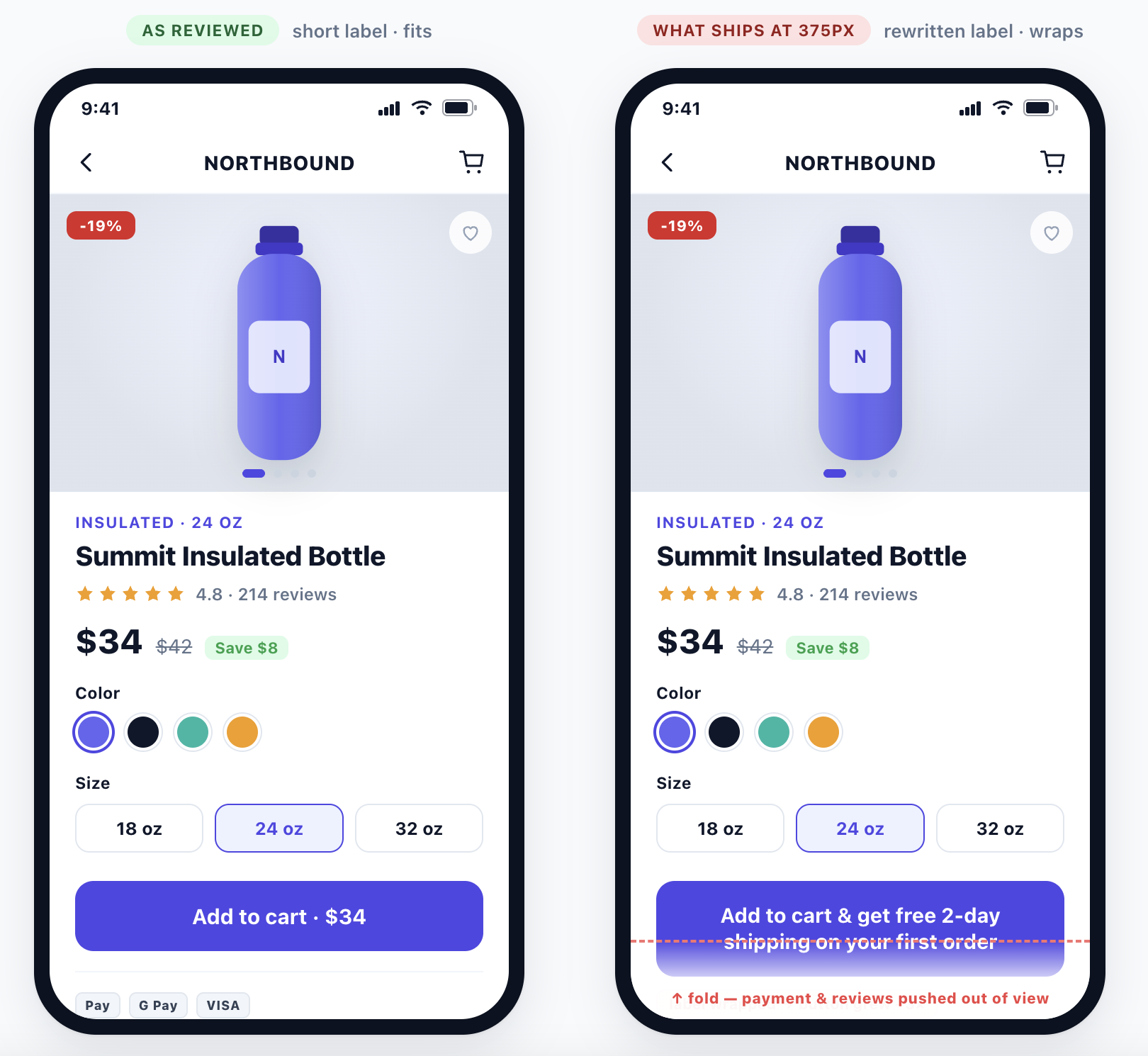
A change rewrites the label on your add-to-cart button. The change looks good on a standard laptop, but on a 375 pixel phone screen it wraps to two lines, the button grows, and the rest of content slides below the fold.
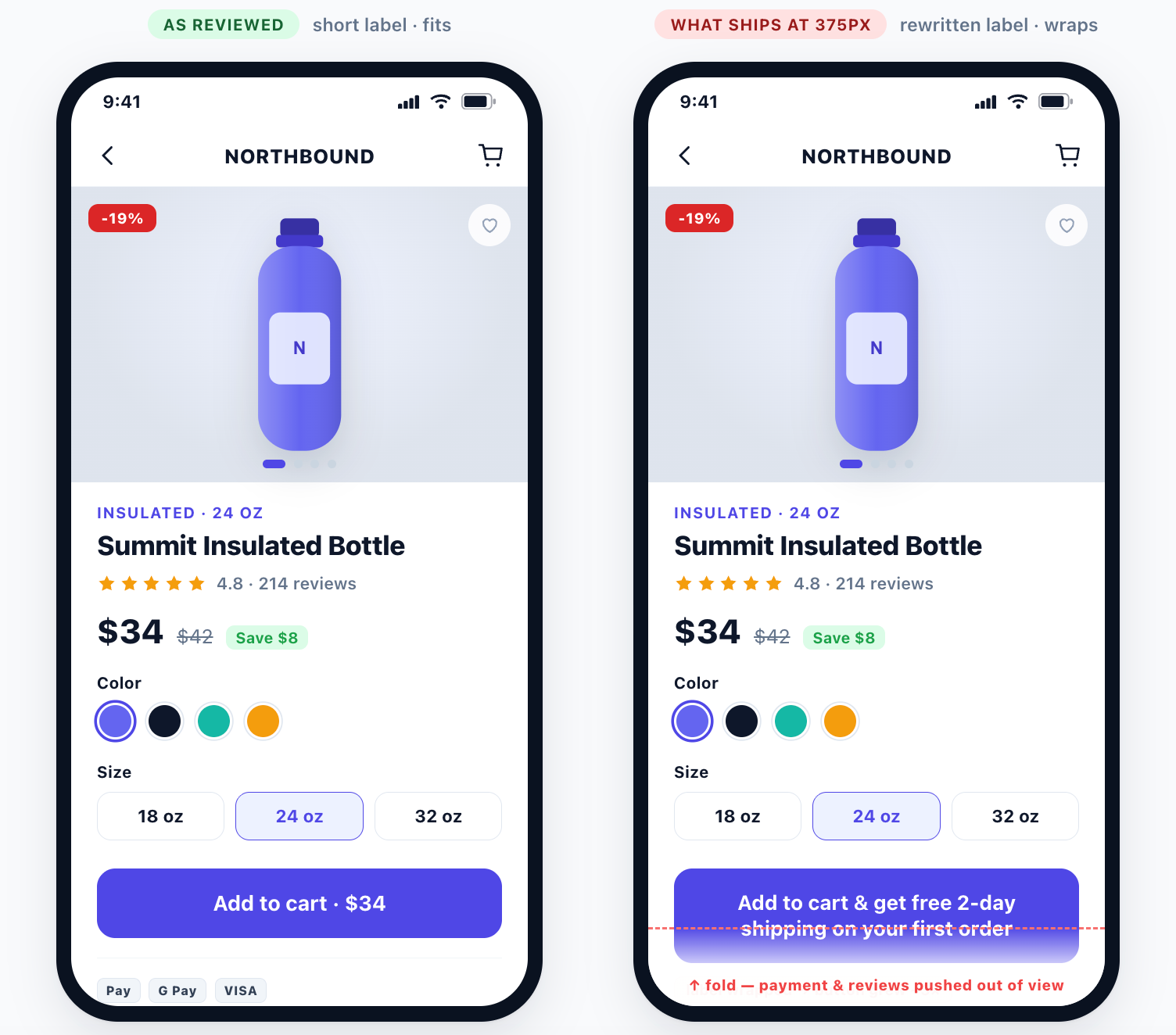
The same type of issue can manifest as a broken grid on mobile, images squeezed into the wrong shape, text you cannot read against its background, elements pushed off the edge of a small screen, the original page flashing before the change swaps in, and content jumping around while the page loads.
No error is thrown for any of those cases. The page looks correct to whoever signed off on it while testing it on a big monitor. The checks that catch this kind of thing come later in this post.
Collisions with other things on the page
Imagine a variant replacing an element inside your product cards. Your 3rd party cart app had attached its click behavior to the element that just got replaced, so that behavior now breaks. The button still looks exactly like a button, but clicking it doesn’t do anything anymore.
Page load order can make this problem even worse. Your apps do not load in the same order every time, and neither does the variant. On a fast connection the change lands after your upsell app and everything sits where you expect. On a slow 3G connection the variant loads first, the app draws itself on top, and your shopper gets both versions stacked.
Wrong content, right layout
A variant hard-codes "Free shipping over $50" into a banner. Two months later your threshold changes to $75 and the variant is still running. Nothing is broken. You are just making a promise you no longer keep.
This problem is even worse for brands who operate in regulated industries. A supplement or skincare claim that nobody approved can quickly turn into a legal problem.
Wrong for some visitors, right for others
This is the type of problem most people never think about, and the one that has the potential to stay hidden the longest.
You ship a change that assumes your price element looks a certain way. For products at full price it does, but for discounted products your theme renders the price differently, with the old price struck through next to the new one. So every item on sale shows a misaligned price, or no price at all.
Your overall conversion rate barely moves, because most of your catalog is fine. The sale items quietly stop selling. The same issue might pop up with other changes that affect different visitors differently: logged-in vs. anonymous shoppers, empty vs. full carts, one vs. multiple currencies, etc.
Why these failures are hard to prevent
Any one of those failures is easy to fix once you know about it, but knowing about it is the hard part, for five reasons.
The page an AI reasons about is not the page a shopper sees
How a web page renders depends on the device type, the screen size, whether the shopper is logged in, what is in their cart, their currency, their country, their consent choices, and which of your on-page apps finished loading first.
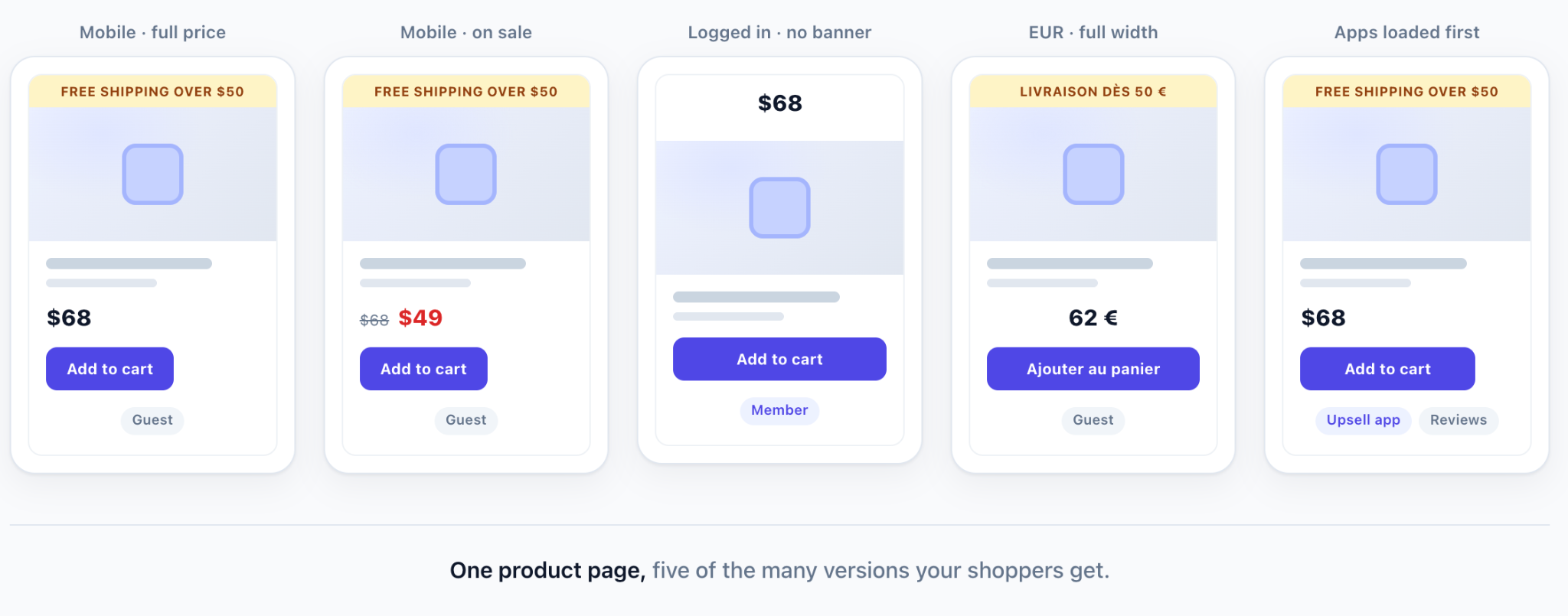
Count a conservative version of that. Four screen widths, logged in or out, on sale or full price, two currencies, and two possible app load orders gives you 64 versions of one product page. Every one of them is a page a real shopper gets.
A change that was tested against one of those 64 is untested against the other 63.
Failures are silent
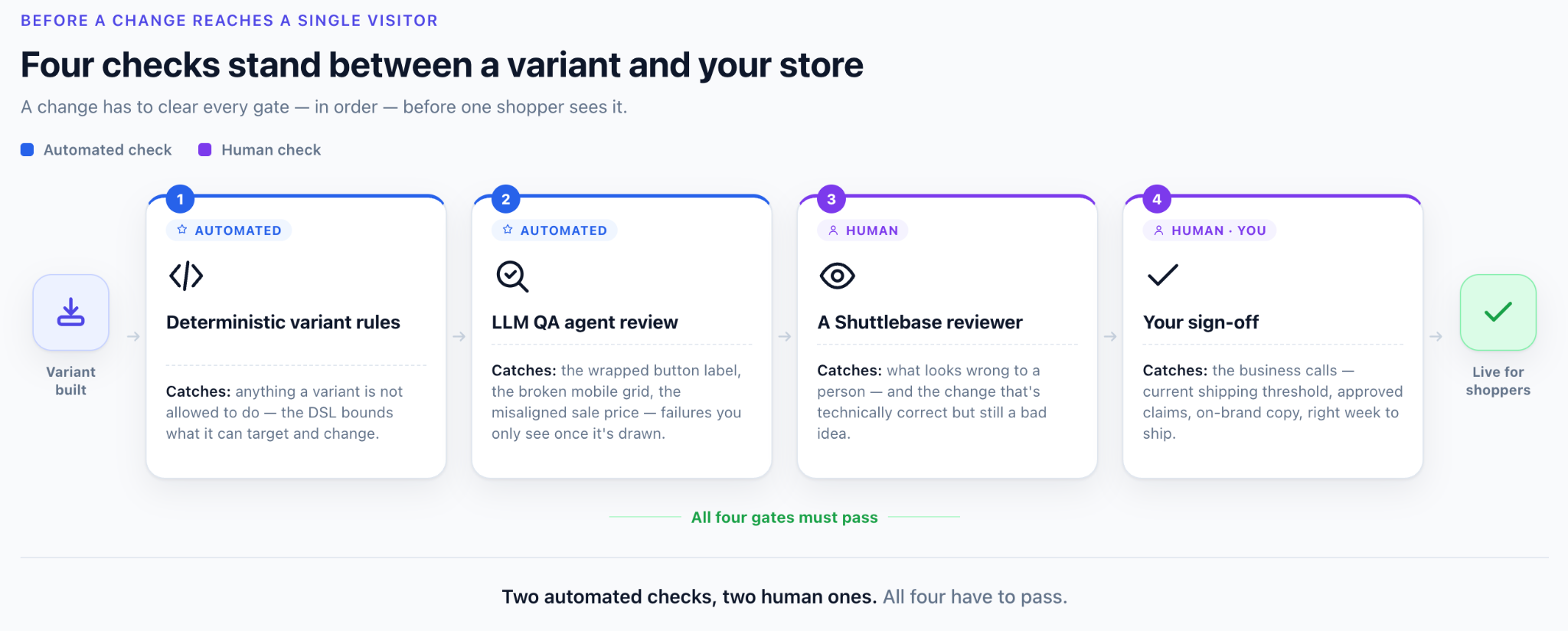
A broken click behavior on a button throws no error. A wrapped label throws no error. A misaligned price throws no error.
Your monitoring stays green. Your error log stays empty. The only symptom is fewer orders, and that signal arrives days after the variant shipped.
The page moves underneath the change
Websites are dynamic creatures: you update your theme, you install an app, you put up a banner announcing a sale. None of those is unusual, but each one might cause a running variant to break.
A change that was correct the day the variant was built can be wrong a week later because the page around it changed.
Without the right measurement, a bad change looks like a slow week
Once a variant is live, noticing whether its changes are helping or hurting poses a real challenge. Looking at overall site performance only works if the variant is running inside an A/B test against the control. If there’s nothing to compare it to - if the change was just pushed to everyone - a conversion-rate drop will be indistinguishable from seasonality, a change in traffic mix, or an ad campaign ending.
Running the variant against the control at the same time is what removes the guesswork, because both versions’ performance is measured at the same time, on the same traffic mix, and the same ad spend. That is also why a test needs enough traffic to say anything, and why statistical significance matters more than a number moving up or down on a dashboard.
How Shuttlebase handles that: four checks before a change reaches a single visitor
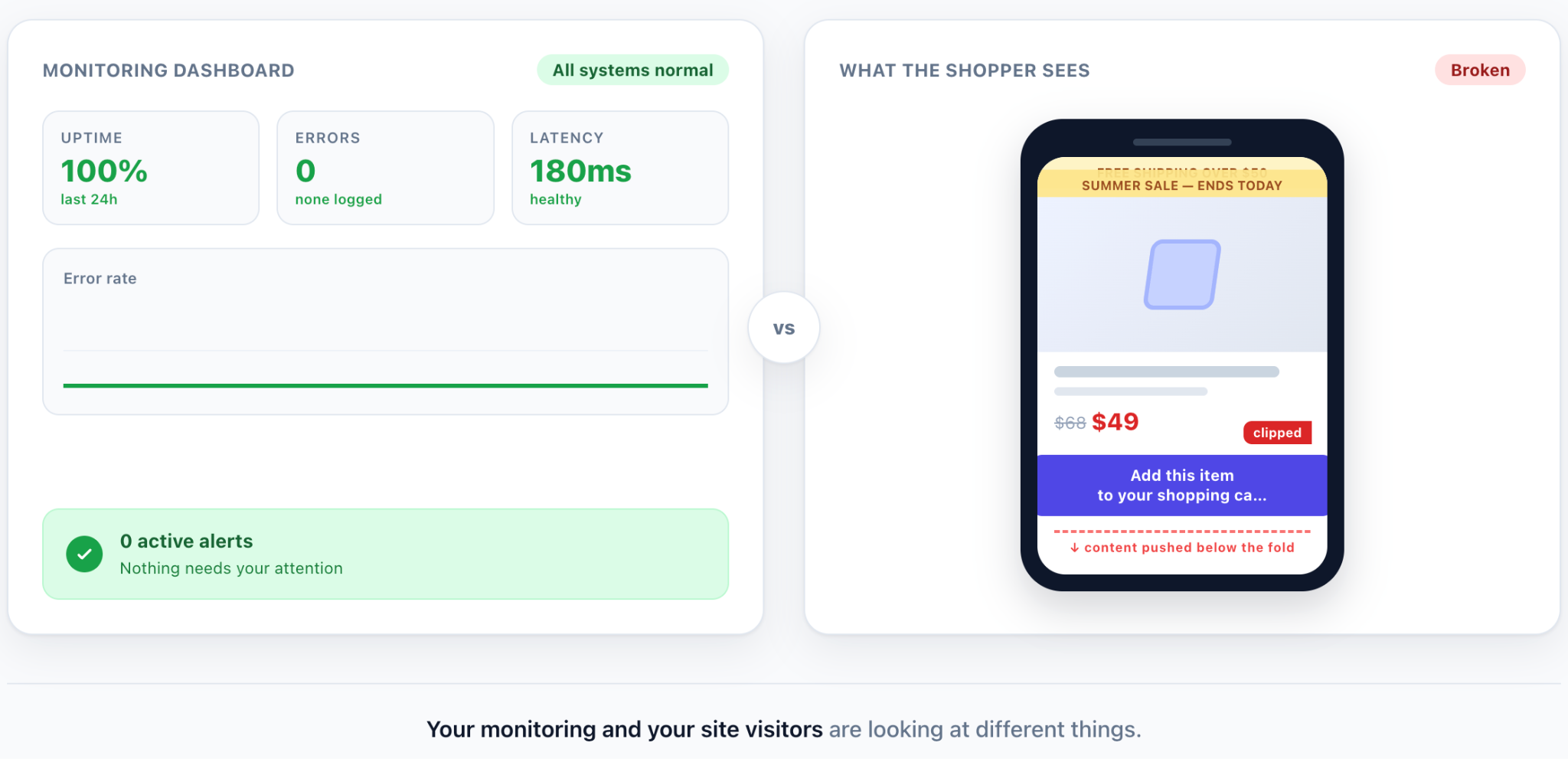
Two of these are automated and two are human. All four have to pass for a change to reach a live website.
Before any of those checks run, the AI has already learned how your brand looks and sounds. At kickoff, Shuttlebase’s agents crawl your store and reverse-engineer the rules a change has to respect: tone of voice, design language, and the policies your pages already state. You can also upload a brand guidebook - colors, fonts, voice docs - so the AI is grounded in material you already trust, not in the internet average. When something comes out off-brand, you flag it, and the engine learns from that feedback. That is how a variant is shaped before the four checks below ever see it.
Deterministic variant rules
Every variant is defined as a set of explicit rules about which elements it targets and what changes it makes. This is done using Shuttlebase’s DSL (Domain Specific Language), which controls what a variant is allowed or not allowed to do. The DSL is what makes the other checks below possible.
An LLM QA agent reviews each variant
An AI reviewer looks at the rendered result. It checks the variant’s changes against the page as a browser builds it, across the contexts that matter, so a rule that reads fine on paper still has to survive being visually drawn on a screen.
The wrapped button label, the broken mobile grid, and the misaligned sale price are all failures that will be captured by this check.
A person reviews it
A Shuttlebase team member looks at the variant before it goes anywhere near your site visitors.
Automated review is good at finding things that measure wrong. People are still better at noticing things that look wrong, and at spotting a change that is technically correct and still a bad idea.
Finally - you review it
Nothing goes live on your store without your sign-off.
This is where you’ll check for everything that is a business decision rather than a defect. It covers whether your shipping threshold is current, whether a claim has been approved, whether the copy sounds like you, and whether this is the week to change your product page. Those are your calls, and they stay your calls.
How Shuttlebase handles a variant after it is shipped
Launch checks answer one question: is the variant safe to ship. The harder question is what happens after, over the couple of months potentially, while your store keeps changing.
Four things hold after launch.
The variant checks the page before it touches it
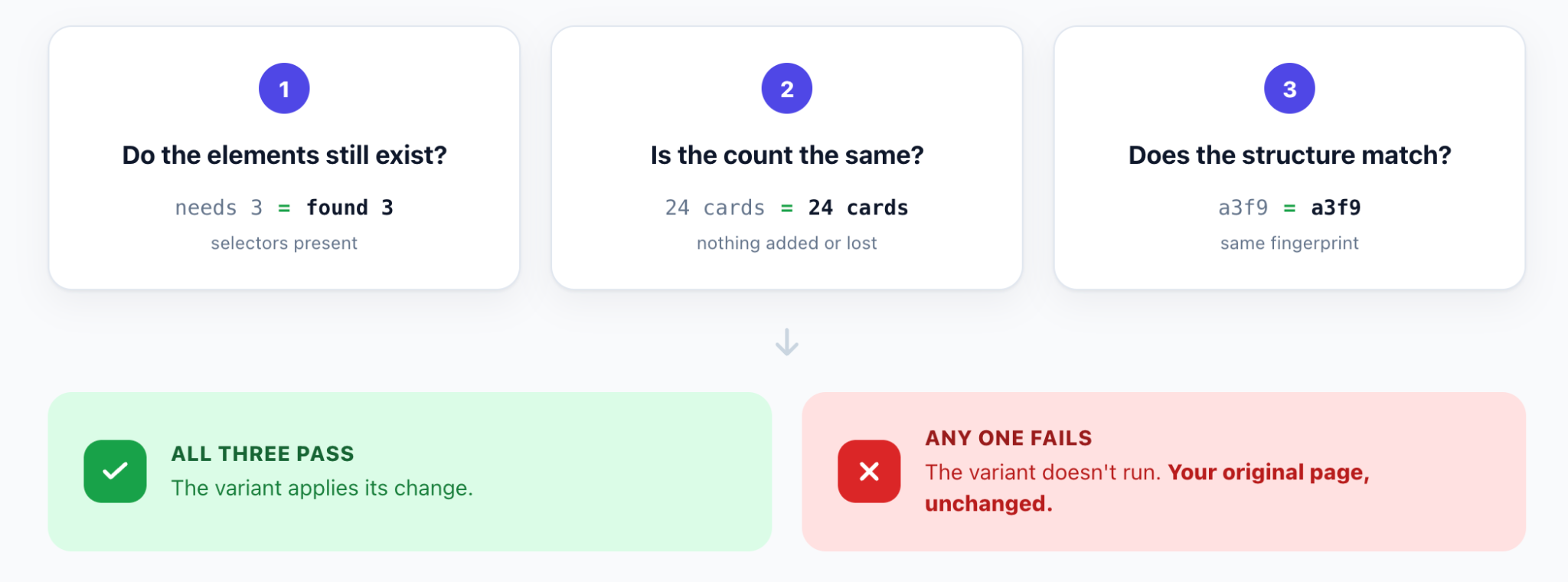
Before applying any of its changes, on every single page load, the variant checks whether the page still matches what it was built for. Three checks run, in order.
Does every element it needs still exist? Before touching anything, the variant looks for all the elements it expected to exist. One missing and it stops.
Is there the right number of them? When the variant is built, it records how many elements each of its rules matched, and it compares that count on every load. A page that should return one add-to-cart button and now returns three is not the page the variant was built for. Neither is a product grid that should return twenty-four cards and returns zero.
Does the surrounding structure still look the same? The variant takes a fingerprint of what each rule returns, a hash, and compares it to the fingerprint recorded when the variant was built. Same fingerprint, same structure, safe to proceed. A different one means that part of the page changed, maybe a new wrapper element, a reordered block, or an app adding its own markup. When that happens, the variant does not run.
Two things about how those checks behave matter as much as the checks themselves.
They are all or nothing. The checks run per rule, and a single failure stops the entire variant. A variant is never half applied, which is what produces the ugliest breakage of all: your new layout with the old button still sitting in it, or a replaced element with nothing wired to it.
And the failure gets reported rather than swallowed. Our backend receives an error naming the check that failed, so the variant gets fixed near real-time instead of sitting broken for a month.
So when a check fails, the worst thing that happens is that your shopper gets your page with nothing added to it. Your page stays your page.
Nothing runs outside a controlled test
Every variant runs as an A/B test against the control. That is the direct answer to “without the right measurement, a bad change looks like a slow week”: the revenue effect is measured against the original page, on the same traffic mix, at the same time - not guessed from a dashboard dip.
A test that is underperforming gets stopped
A/B tests are watched against guardrail metrics, and a test that is doing damage can be ended. When a test finishes, the losing variant is dropped automatically, so nothing keeps running just because nobody remembered it.
Turning it off
If you need a variant gone, a newly launched one can be turned off in minutes. One that has been running longer takes about an hour. Fast, not instant - and the only reason it can be that fast is that nothing was ever written into your theme, your repository, or your server. Your page was always your page.
So - will AI break your site?
Yes, it can. An unguarded change on a live storefront can wrap a button, kill a click handler, ship a stale claim, or break only for shoppers on sale items, and do all of that without throwing an error.
The useful question is not whether the risk is zero. It is what happens when something goes wrong, and how fast you can get back to a page you trust.
If a variant never touches your theme or your repo, if it has to pass checks before a shopper sees it, if it refuses to run when the page underneath it has moved, and if turning it off takes minutes rather than a deploy - then the worst case is not a broken store. It is your original page, unchanged. That is a bounded risk, and it is one you can explain to whoever has to approve the script.
If you want that kind of AI conversion rate optimization on your store - continuously testing, with those bounds in place - use Shuttlebase. That is what we built it for.